
Approver
Approval Management System for SharePoint Online
Approver brings comprehensive approval workflow management to SharePoint Online. Create reusable approval templates with custom form fields, define sequential and parallel approval chains, upload supporting documents with named slots, and track multi-step approvals in real time. Automated reminders and escalation keep approvals moving. Bulk operations, advanced search with saved views, and template cloning accelerate daily workflows. Built for organizations that need structured, auditable approval processes with FedRAMP-compliant security.
Unlimited users per site · 30-day free trial · No purchase required to start
Buy NowScreenshots
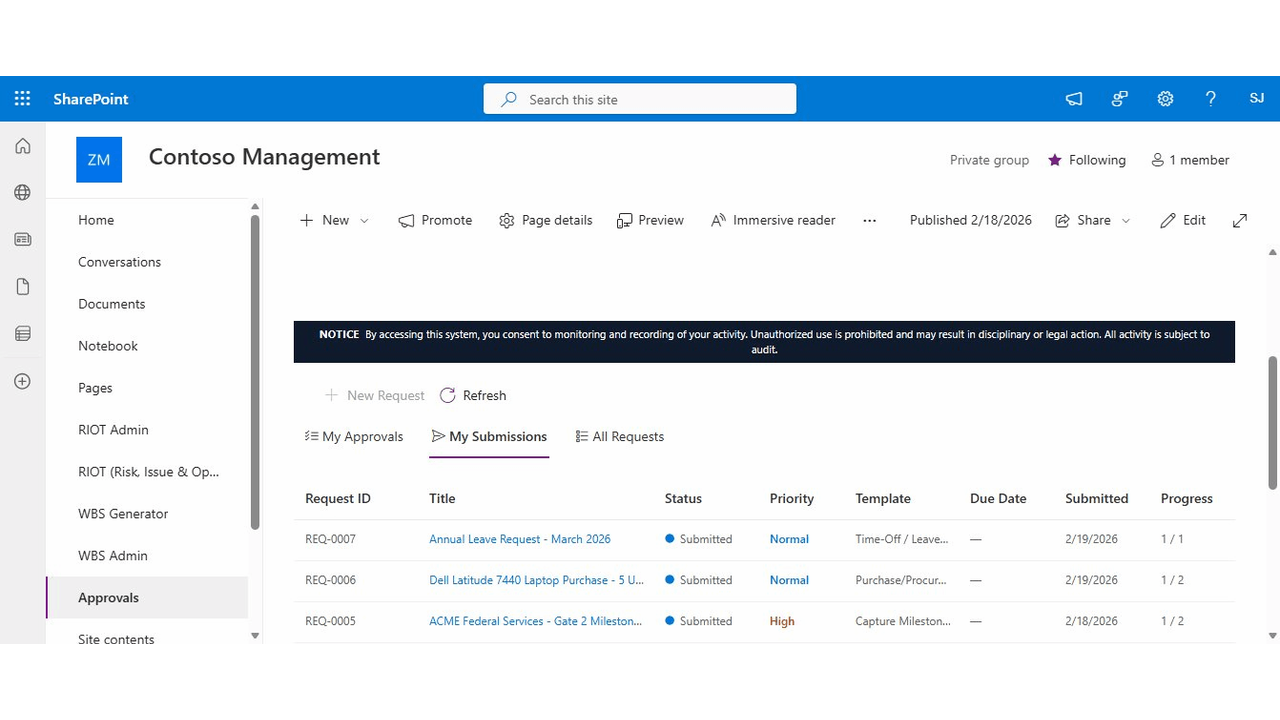
My Submissions & My Approvals
View all your submitted approval requests with status tracking, priority indicators, template types, due dates, and workflow progress. Switch between My Approvals and My Submissions tabs to see items requiring your action or items you've submitted.
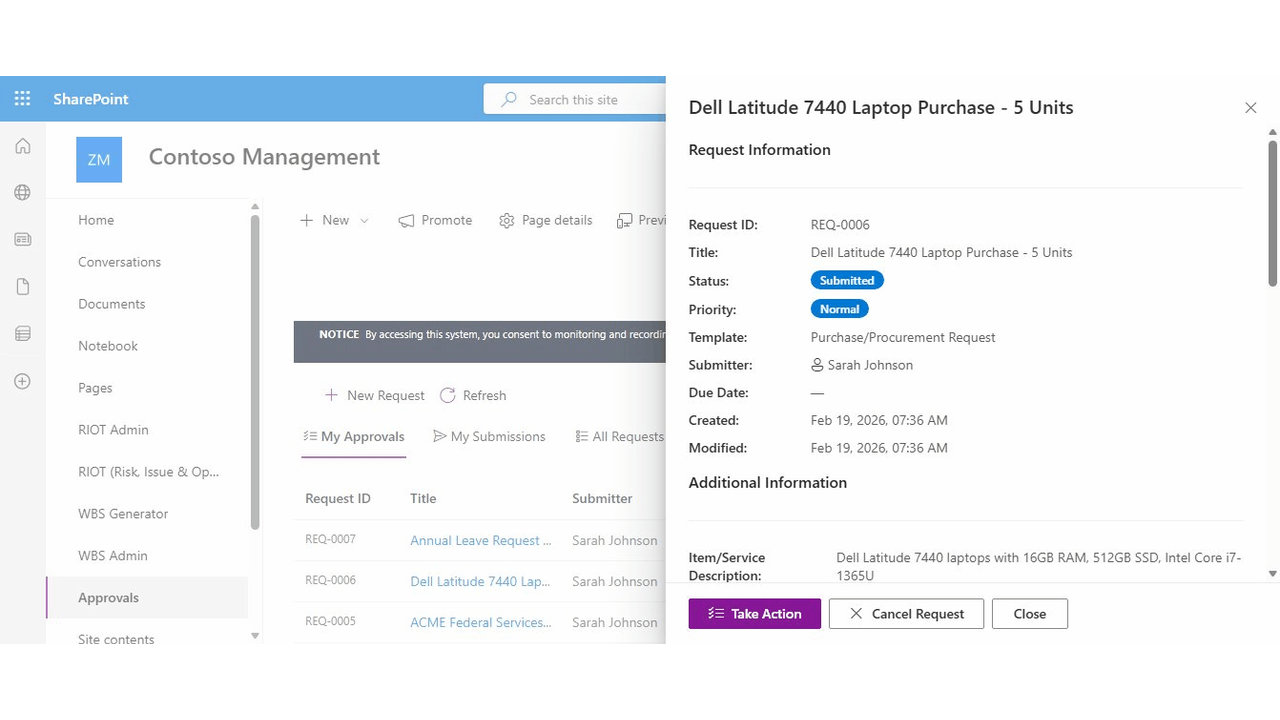
Request Detail Panel
Comprehensive request detail view showing all request information, custom field values, status, priority, and template type. Take action directly from the panel with approve, reject, return, and cancel buttons.
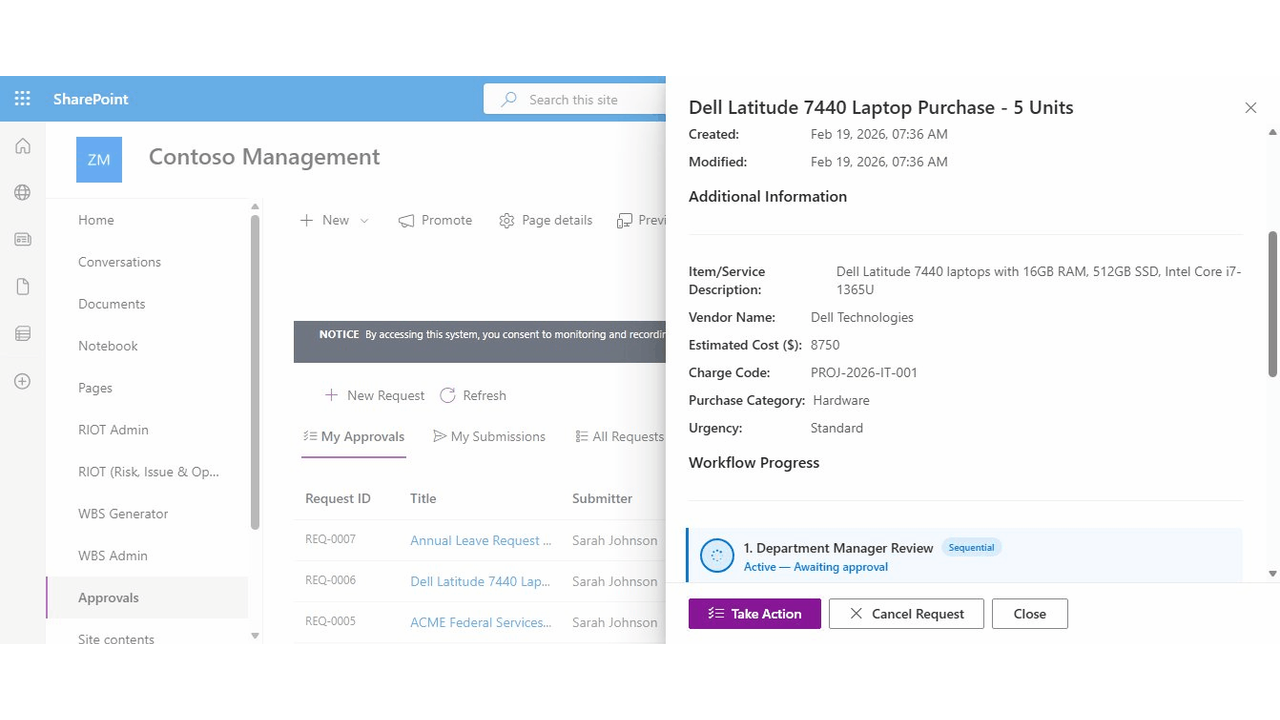
Custom Fields & Workflow Progress
Dynamic custom fields defined by the template (text, number, date, choice, multi-line). Visual workflow progress showing each approval step, current approver, and step-by-step status with timestamps.
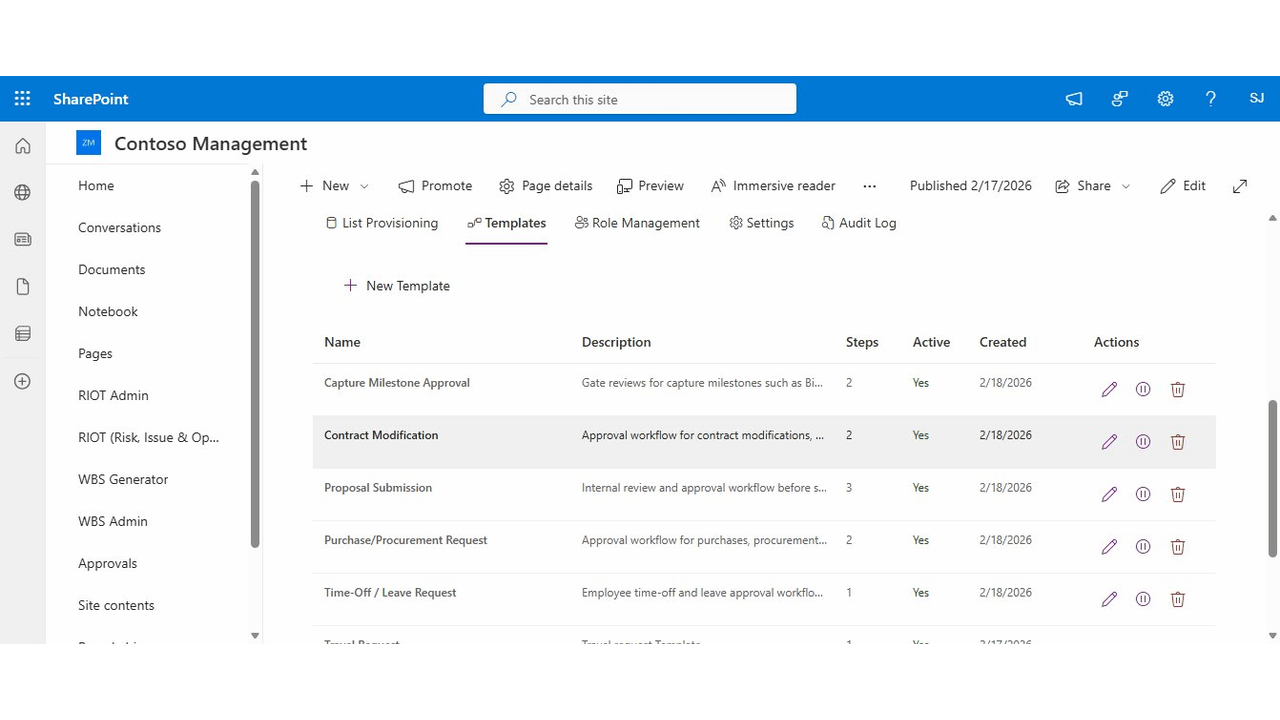
Admin Template Manager
Create and manage reusable approval templates. Define custom form fields (text, number, date, choice), configure multi-step approval chains with sequential or parallel steps, and set up named document upload slots.
Key Features
Configurable Approval Templates
Create reusable templates with custom fields, multi-step approval chains, and named document slots. Define exactly what information submitters need to provide and who approves at each step.
Custom Form Fields
Add text, number, date, choice (dropdown), and multi-line text fields to any template. Mark fields as required or optional. Dynamic forms render automatically based on the selected template.
Sequential & Parallel Workflows
Define approval chains with sequential steps (one after another) or parallel steps (multiple approvers simultaneously). Each step can have different approvers and can be configured independently.
Document Upload with Named Slots
Define required and optional document upload slots in your templates. Submitters see clear guidance on what documents to attach, with drag-and-drop upload support.
Real-Time Progress Tracking
Visual workflow progress shows exactly where each request stands. See which step is active, who the current approver is, and the complete history of actions taken with timestamps.
Automated Email Notifications
Automatic email notifications at every workflow step: submission confirmation, approval requests, approvals, rejections, and returns. Keep all stakeholders informed without manual follow-up.
Automated Reminders & Escalation
Configurable per-step reminder emails nudge pending approvers after a set number of days. If approvals stall, automatic escalation reassigns to backup approvers. Overdue alerts notify submitters and admins.
Bulk Approve, Reject & Cancel
Multi-select approvals and process them in a single action. Batch approve or reject items from My Approvals, or batch cancel Draft and Submitted requests from My Submissions. Per-item results with error reporting.
Advanced Search & Saved Views
Full-text search across request titles and IDs. Filter by status, priority, template, date range, and submitter. Sort any column. Save named filter combinations as personal views for instant recall.
Template Cloning
Duplicate any existing approval template with one click. Deep-copies all steps, custom fields, document slots, and viewer settings. Quickly create variations of your workflows without starting from scratch.
Use Cases
Capture Milestone Approvals
Gate reviews for bid/no-bid decisions, proposal reviews, and capture milestones. Track opportunity details, win probability, and attach gate review briefings.
Purchase & Procurement
Approve purchases with vendor details, cost estimates, charge codes, and sole-source justifications. Route through department managers and finance for proper authorization.
Contract Modifications
Manage contract mod approvals with modification type, dollar value, justification, and supporting documentation. Track through contracts and program management.
Proposal Submissions
Internal review and sign-off before submitting proposals. Track solicitation details, submission deadlines, team arrangements, and attach executive summaries.
Technical Details
SharePoint Framework (SPFx)
Native SPFx web parts (Main + Admin) deployed to your SharePoint Online tenant app catalog. No external servers or databases required.
Data Stays in Your Tenant
All approval requests, templates, and documents are stored in SharePoint lists and document libraries within your Microsoft 365 environment.
Role-Based Access Control
Admin, Editor, and Viewer roles control who can manage templates, create requests, and view submissions. Stakeholder visibility settings for additional oversight.
FedRAMP-Compliant Security
Comprehensive audit logging, input validation, per-user lockout protection, system use banner, and session management for compliance requirements.