
RIOT
Risk, Issue & Opportunity Tool for SharePoint Online
RIOT brings enterprise-grade project risk governance to SharePoint Online. Track risks, issues, and opportunities with configurable 5×5 probability-impact scoring, interactive heat maps, multi-dimensional impact assessments, and a real-time executive dashboard. Export formal Word and PDF reports, bulk-import items from CSV, link related items across registers, manage structured review cycles, and collaborate with threaded comments. Built for defense contractors, government agencies, and any organization that needs rigorous project governance with FedRAMP-compliant security.
Unlimited users per site · 30-day free trial · No purchase required to start
Buy NowScreenshots
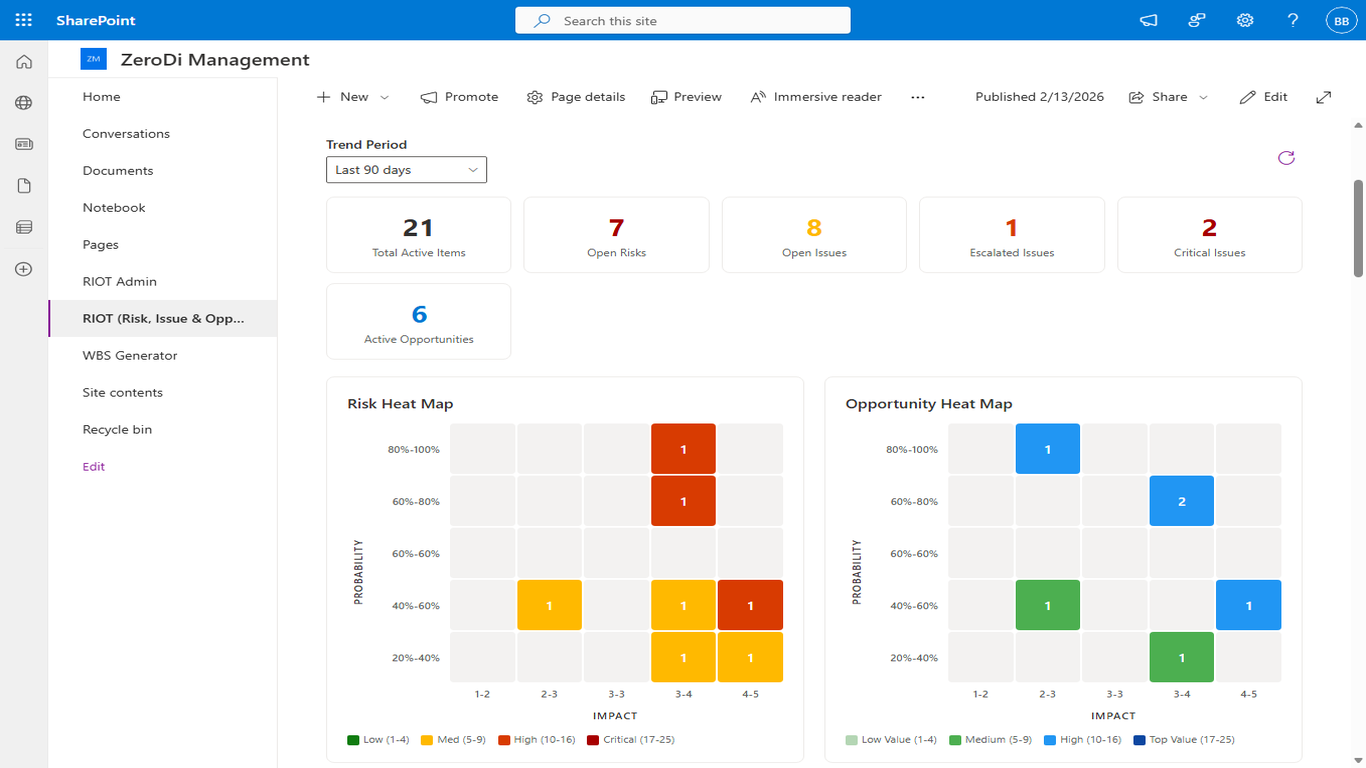
Executive Dashboard
Real-time KPI cards showing total active items, open risks, open issues, escalated and critical items. Interactive 5×5 probability-impact heat maps for both risks and opportunities with color-coded severity levels.
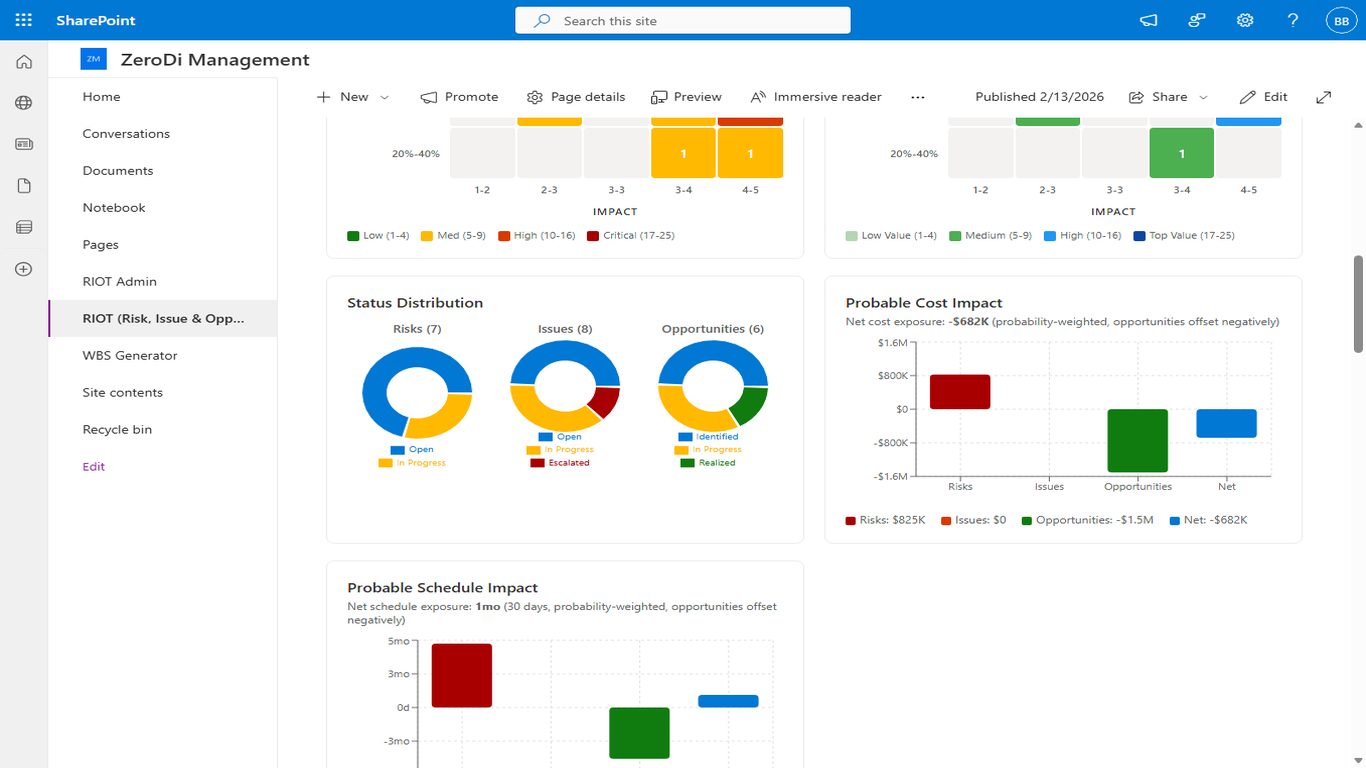
Multi-Dimensional Impact Analysis
Assess impact across cost, schedule, and performance dimensions. Track trend data over configurable time periods with visual analytics to identify patterns in your risk portfolio.
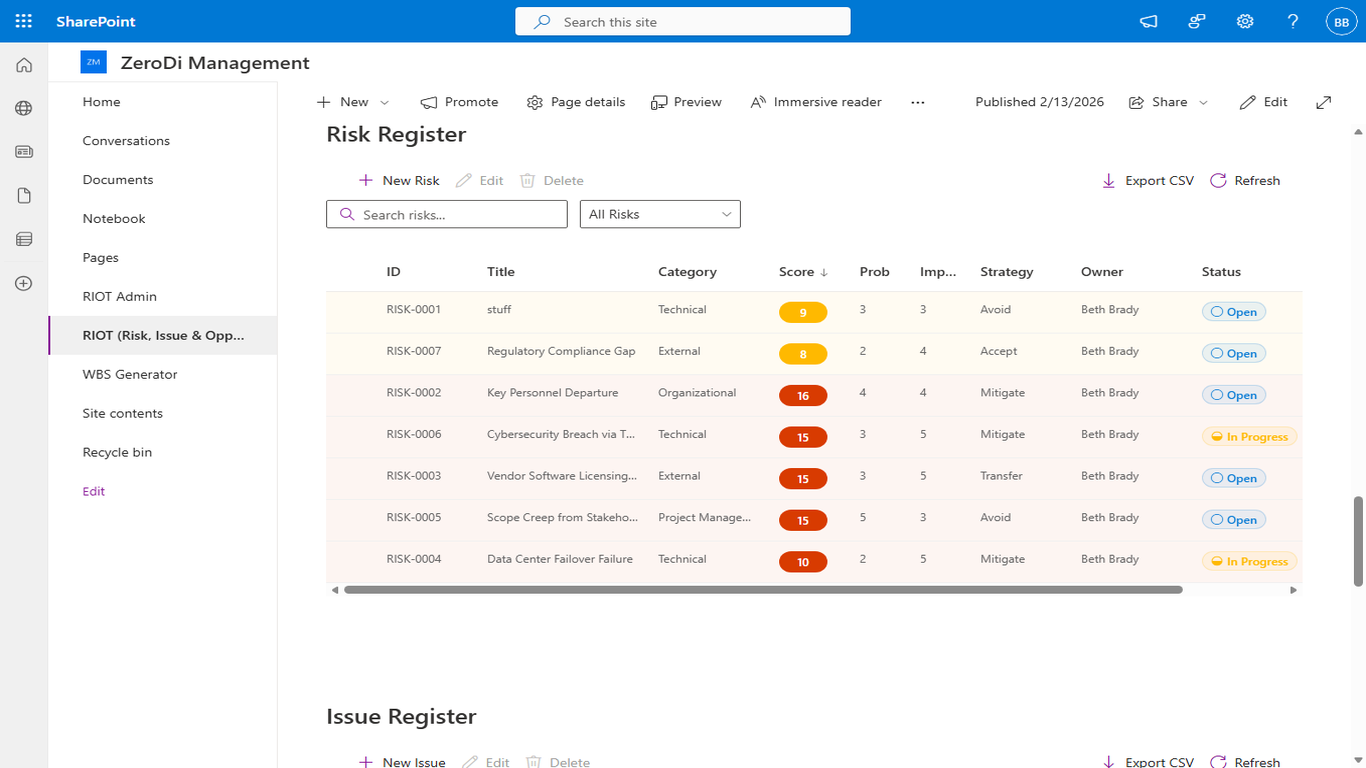
Risk Register
Complete risk register with sortable columns, status indicators, probability and impact scores, composite risk ratings, and assigned owners. Filter and search across all risk items with CSV export capability.
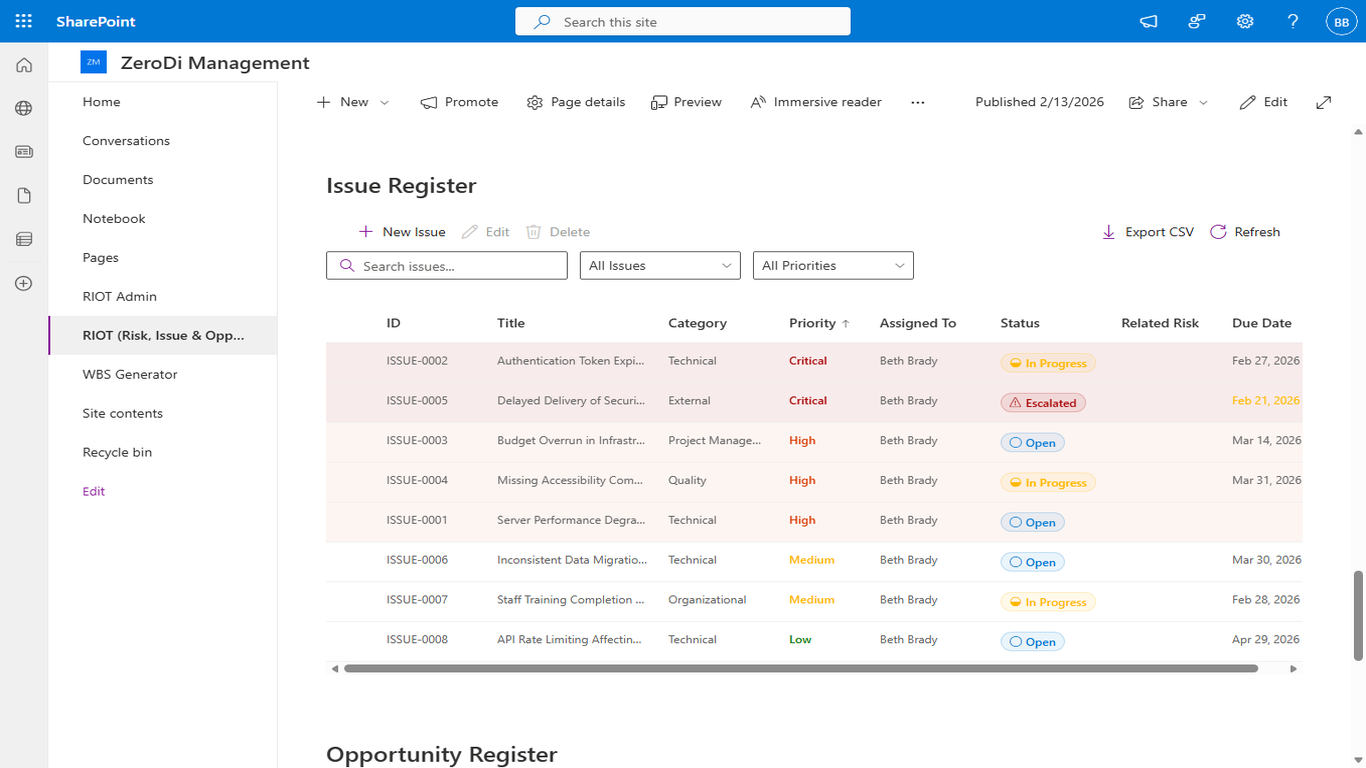
Issue Register
Dedicated issue tracking with priority-based escalation, status workflow, and resolution tracking. Separate registers for risks, issues, and opportunities keep your governance organized.
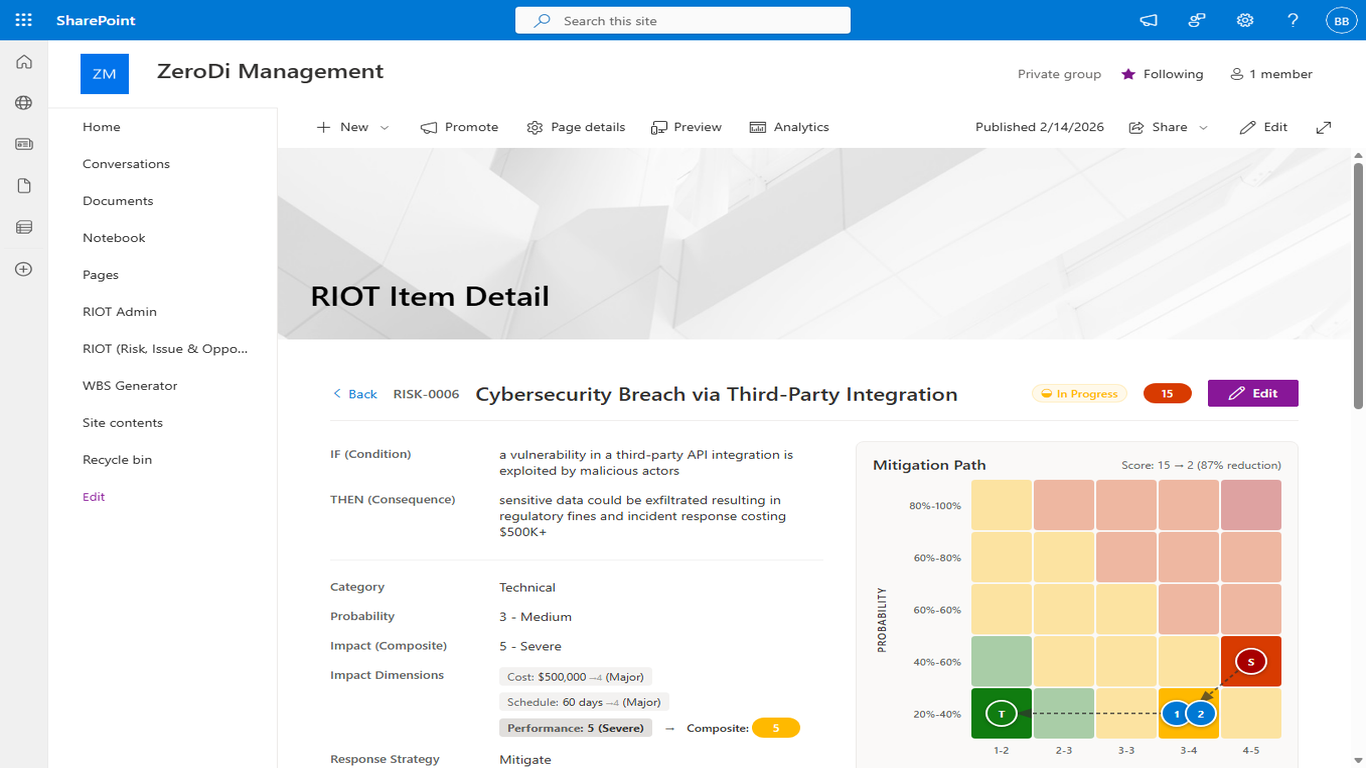
Item Detail & Mitigation Planning
Comprehensive item detail view with IF/THEN condition and consequence statements, multi-dimensional impact assessment (cost, schedule, performance), mitigation path visualization showing score reduction, and full audit trail.
Key Features
5×5 Probability-Impact Heat Maps
Interactive heat maps display your risk and opportunity portfolio at a glance. Color-coded cells show item counts by severity level, making it easy to identify concentrations of risk.
Multi-Dimensional Impact Assessment
Assess each item across cost, schedule, and performance dimensions. Composite scores are calculated automatically using configurable weighting to provide an overall risk rating.
Mitigation & Enhancement Tracking
Define step-by-step mitigation plans for risks and enhancement strategies for opportunities. Track progress through each step with visual path diagrams showing score reduction over time.
Executive Dashboard & KPIs
Real-time dashboard with KPI cards, trend analytics, and configurable time periods. Get instant visibility into your project's risk posture without leaving SharePoint.
Word & PDF Report Generation
Export formal reports to Word (.docx) and PDF formats for program reviews and CDRL deliverables. Select which sections to include: executive summary, risk register, issue register, opportunity register, mitigation status, and heat map summary.
CSV Bulk Import
Bulk-create risk, issue, or opportunity items from CSV files. A guided wizard handles column mapping, data validation with row-level error reporting, and batch creation with progress tracking.
Cross-Register Linking
Create bidirectional links between risks, issues, and opportunities with typed relationships (Related, Caused By, Mitigated By, Converted From). Promote a risk to an issue with a single click, automatically linking the two items.
Review Cycles & Workflow
Structured periodic review management with configurable cycle lengths per category. Visual overdue and upcoming indicators, batch review mode for efficient walk-throughs, and full review history tracking on every item.
Comments & Activity Feed
Threaded comments on any risk, issue, or opportunity with @mention notifications. Resolve and re-open comment threads. A cross-register activity feed on the dashboard shows recent collaboration across your entire portfolio.
Role-Based Access Control
Configure admin, editor, and viewer roles to control who can create, modify, and view risk items. Per-user lockout protection and full audit trails for compliance.
FedRAMP-Compliant Security
Built with FedRAMP security controls in mind. All data stays within your SharePoint tenant. Comprehensive audit logging, input validation, and session management.
Technical Details
SharePoint Framework (SPFx)
Built as a native SPFx web part that deploys to your SharePoint Online tenant app catalog. No external servers or databases required.
Data Stays in Your Tenant
All risk, issue, and opportunity data is stored in SharePoint lists within your Microsoft 365 environment. Zero Di never accesses or stores your data.
Import & Export
Export registers to CSV for offline analysis, import items in bulk from CSV with guided column mapping, and generate formal Word or PDF reports for program reviews and stakeholder briefings.
Email Notifications
Automated email notifications for risk status changes, escalations, and assignments. Uses Microsoft Graph API with Mail.Send permission.