
WBS Manager
Work Breakdown Structure Tool for SharePoint Online
WBS Manager delivers MIL-STD-881F compliant Work Breakdown Structure management directly within SharePoint Online. Build, manage, and cost hierarchical project structures with pre-built defense acquisition templates, drag-and-drop editing, resource allocation with hours and cost tracking, Basis of Estimate documentation, and exportable Word, PDF, and Excel reports. Features include undo/redo, search and filter, keyboard shortcuts, Gantt timeline view, project dashboard with charts, Excel import, Earned Value Management, auto-save, and custom templates. Designed for defense contractors and program managers who need rigorous WBS governance.
Unlimited users per site · 30-day free trial · No purchase required to start
Buy NowScreenshots
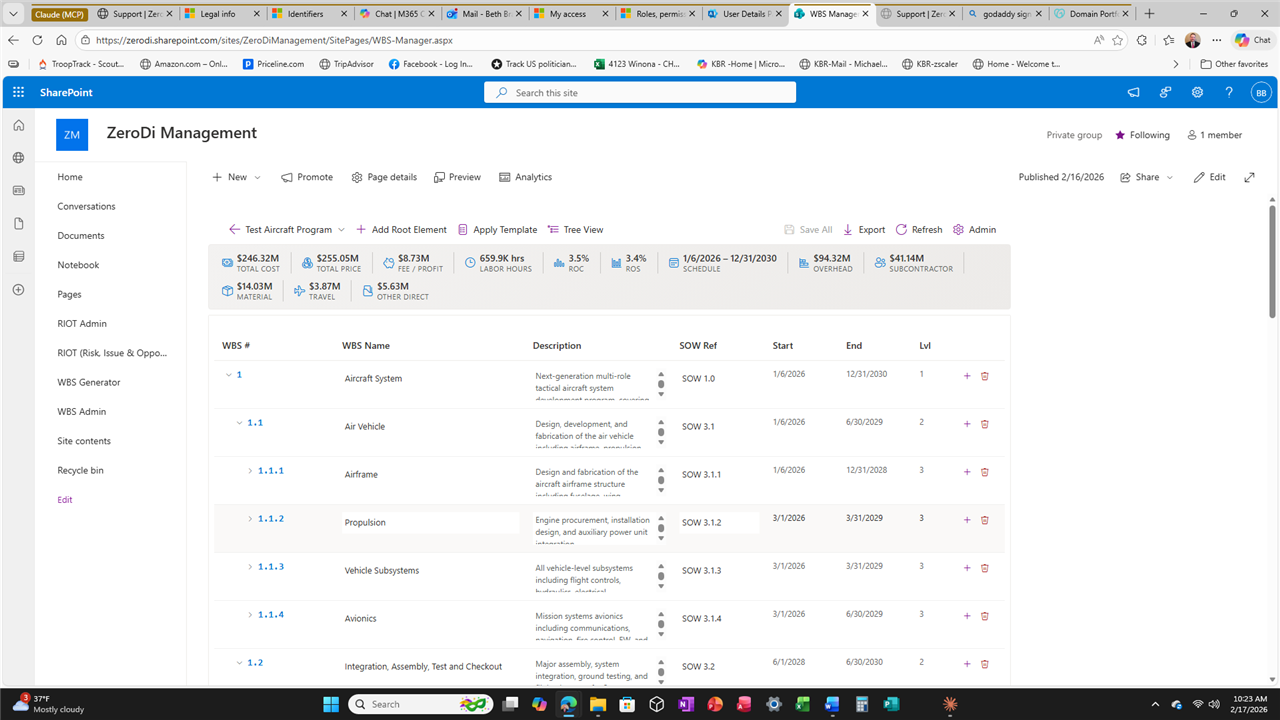
Table View with Cost Summary
Comprehensive table view showing the full WBS hierarchy with cost rollups, schedule dates, SOW references, and status indicators. KPI cards at the top display total project cost, labor hours, materials, overhead, and subcontractor costs at a glance.
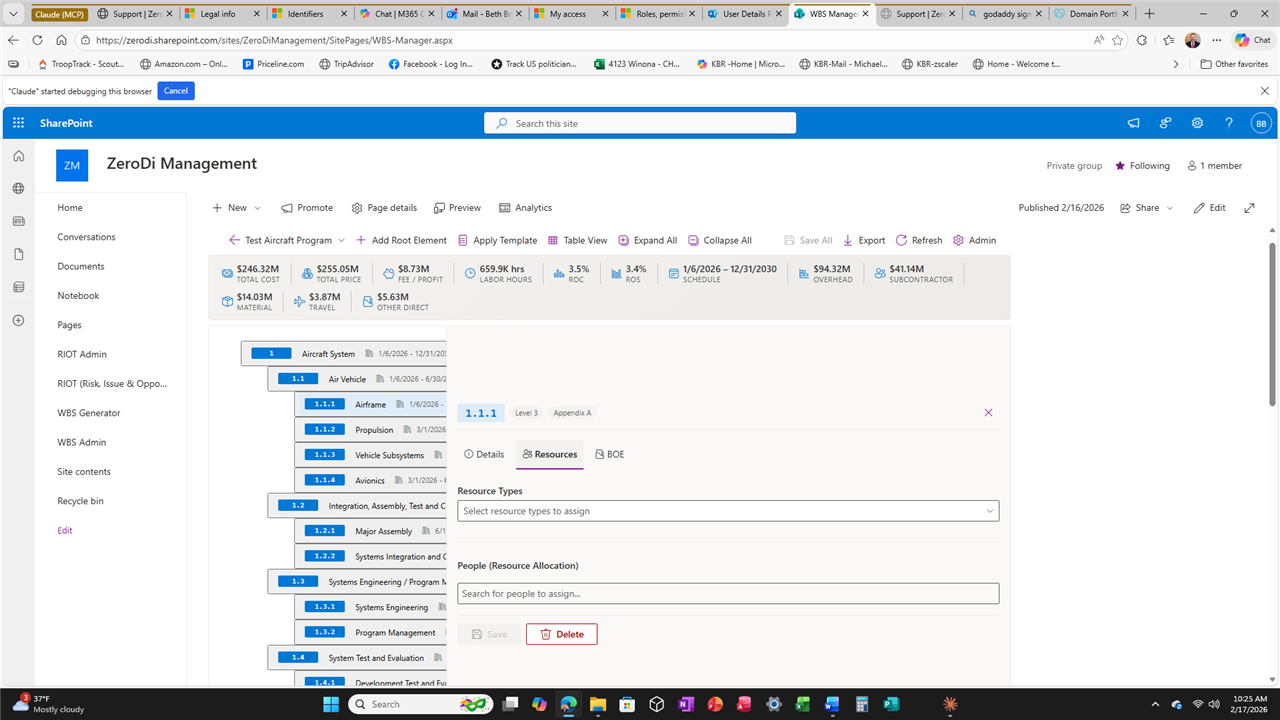
Resource Allocation
Assign resource types and people to any WBS element. Interactive tree view with expand/collapse, detail panels showing element descriptions, resource assignments, and Basis of Estimate documentation.
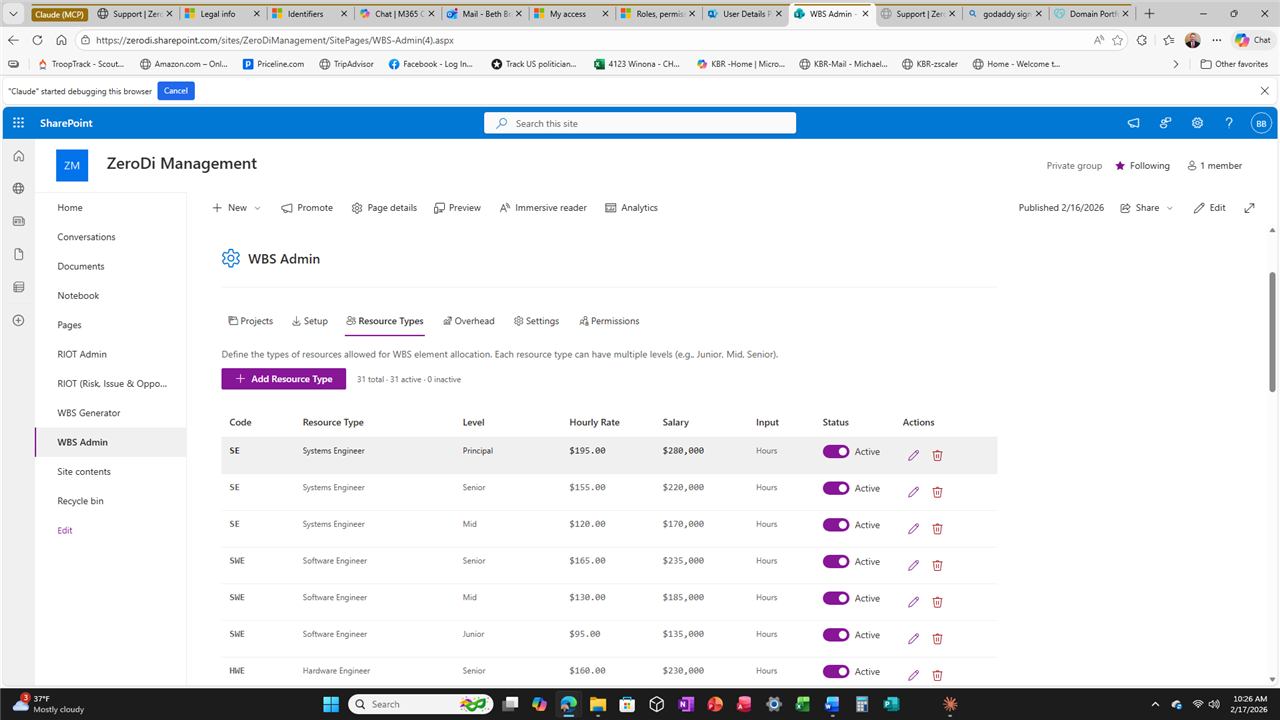
Admin Panel & Rate Management
Configure overhead rates, G&A rates, fee percentages, and resource types. Role-based access control with admin, editor, and viewer permissions at the project level.
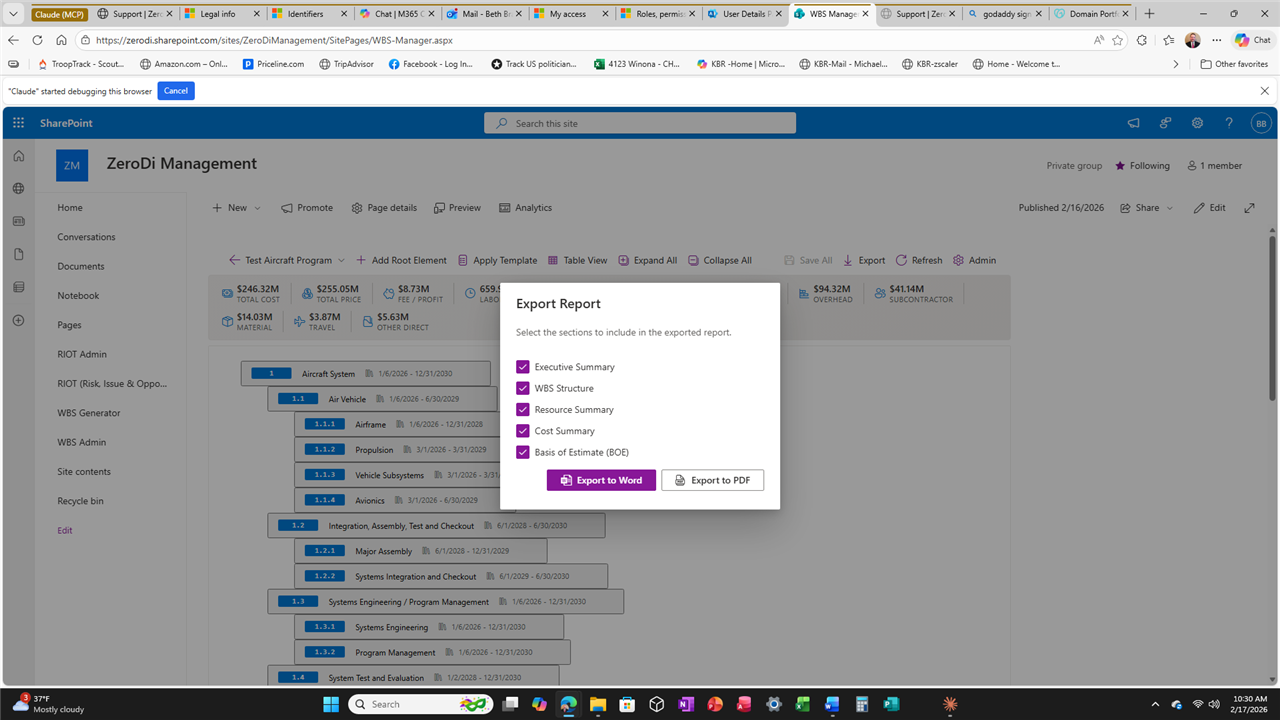
Export to Word & PDF
Generate professional WBS reports in Word (.docx) and PDF format. Reports include the full WBS hierarchy, cost summaries, resource allocations, BOE documentation, and schedule information.
Key Features
MIL-STD-881F Templates
Pre-built templates for Aircraft Systems, Space Systems, Sea Systems, Cyber Systems, Missile Systems, and more. Save your own custom templates for reuse across projects.
Tree, Table & Gantt Views
Switch between interactive tree view, spreadsheet-like table view, and Gantt timeline view. Drag-and-drop elements to reorganize your WBS with full undo/redo support.
Resource Allocation & Cost Roll-Up
Assign labor resources with hours and rates. Track direct costs, materials, subcontracts, and travel. Automatic cost rollup displayed directly in the tree view with real-time totals.
Earned Value Management (EVM)
Track BCWS, BCWP, and ACWP at the element level. Automatic calculation of SPI, CPI, EAC, and other EVM metrics for program performance monitoring.
Excel Import & Export
Import WBS structures from Excel spreadsheets with automatic hierarchy detection. Export comprehensive reports to Excel, Word, and PDF formats.
Project Dashboard
Interactive charts showing cost distribution by branch, resource utilization, cost by category, and schedule overview. EVM S-Curve visualization when EVM data is available.
Search, Filter & Keyboard Shortcuts
Find any element instantly with full-text search and automatic tree expansion. Keyboard shortcuts for common operations: Ctrl+Z undo, Ctrl+Y redo, Ctrl+S save, and more.
Bulk Operations & Multi-Select
Select multiple elements to apply bulk resource assignments. Copy and paste entire subtrees to duplicate complex branches. Auto-save keeps your work safe.
Basis of Estimate (BOE) Documentation
Document the rationale behind every cost estimate at the element level. Link BOE narratives directly to WBS elements for audit-ready documentation.
Overhead, G&A & Fee Management
Configure overhead rates, General & Administrative rates, and fee percentages. Rates are applied automatically to calculate fully-burdened costs across the WBS.
Version History
View detailed change history for any WBS element showing who changed what and when. Restore previous versions with a single click for full traceability.
Custom Templates
Save any project structure as a reusable template. Share templates across your organization alongside the built-in MIL-STD-881F standard templates.
Technical Details
SharePoint Framework (SPFx)
Native SPFx web part deployed to your SharePoint Online tenant app catalog. No external servers, no databases outside SharePoint, no third-party dependencies.
Multi-Project Support
Manage multiple WBS projects from a single SharePoint site. Each project has its own hierarchy, cost settings, and role assignments for team isolation.
Data Stays in Your Tenant
All WBS data, cost information, and resource allocations are stored in SharePoint lists within your Microsoft 365 environment. Zero Di never accesses or stores your data.
FedRAMP-Compliant Security
Built with FedRAMP security controls. Comprehensive audit logging, input validation, role-based access control, and session management for compliance requirements.